Hello this is a post I selected from the internet that should interest educators as well as those that need to communicate with a large audience.
My associates and I are very involved with unified communications, (UC), products that are Microsoft and non-Microsoft, that provide incredibly versatile communications through email, voice and IM.
This is a guest post from Hélène Fyffe, an undergraduate starting her final year at Edinburgh Napier University, having spent a year on placement with Microsoft UK Education as part of her course.
If you’ve been following the Microsoft Education blogs, you’ll probably be aware of Microsoft’s Office 365 Pro Plus Benefit for Students and the advantages it has been bringing to higher education students in the UK.
Over the coming months look out for more blogs that will explore scenarios where students can use features of the package to enhance their Higher Education experience.
In case you’re not familiar with the Office 365 Pro Plus Benefit for Students, any institution worldwide that licenses Office for staff and faculty can provide access to Office 365 for students at no additional cost. As a result, more than 35,000 institutions worldwide are automatically eligible to deliver the package to their students.
Office 365 Pro Plus includes all the familiar and full Office applications, such as Word, Excel and PowerPoint, and offers the ability for these to be locally installed on up to five devices and available offline.
Furthermore, when a school combines the Office Pro Plus Benefit with our other cloud services – Exchange Online, SharePoint Online and Lync Online – of which all are available free through Office 365 Education, students have access to the same set of productivity tools and services used by Fortune 500 companies all over the world.
Lync and primary research
Helene – lync dissertation 1
Primary research is an interesting challenge that many students have to undertake during their university career, normally in their final year for their dissertation or final project. This involves carrying out their own research to gather data to analyse correlations, trends and ultimately, to try and find solutions to a particular topic, for example ‘the impact social media has on consumer engagement’. Most students will choose to gather data by sending surveys, carrying out interviews or focus groups, undertaking experiments and observing behaviour of people (or animals if they’re reading a science degree).
Limitations on creative thinking
The biggest common denominator that impacts students’ creativity regarding any face-to-face research is cost. Unfortunately, students don’t tend to be funded for their final year projects which means that if they want to interview a particular candidate from another city, or even another country, they are likely to have to abandon the idea. Similarly, students don’t tend to carry out telephone interviews or telephone surveys due to costs.
My student group are all currently trying to choose the most suitable primary research methods for our projects and I can comfortably say that lots of them are quickly choosing online surveys as a method, because of the ease and cost. It’s been frustrating to see that students who are really keen to carry out interviews to gather qualitative research are considering altering the geographical focus of their topics to Scotland so that they can interview people at low cost. You can imagine how limiting this can be to students’ aims.
Helene – lync dissertation 2
The options that Lync technology can provide via the ProPlus Benefit for Students are impressive!
Video capabilities: Interviews or even group interviews could be carried out with anyone in the world using the video conferencing capabilities, in a secure environment: if a candidate from an external organisation (such as a financier, a scientist or a government minister) were being interviewed, the link to the meeting would smartly slot into their work calendars and they could join the video call using the Lync browser app which would provide a formal and professional experience.
Poll feature: Once on the call, students could directly gather illustrated data using the Lync poll feature which could be really useful in providing quantifiable statistics to strengthen the arguments they are deducing from their qualitative interview analyses.
Helene – lync dissertation 3
Record feature: The fact that calls and video conferences could be recorded (obviously with the consent of the interviewee) is really significant as students are required to refer back to their interviews to examine patterns in opinions, semantics and behaviour. The simplicity of this feature would be heaven to students and save them from investing in unnecessary recording apparatus – seriously, students have been piping up in class and asking my lecturer where they can buy ‘cheap recording equipment you see the LAPD use in the movies’..
Helene – lync dissertation 4
There is no question about the value Lync technology could bring to students’ studying experience. By having enterprise-grade tools at their fingertips, students can be empowered to stretch themselves to their full capabilities and have a really interesting research experience. Thanks to the Office 365 ProPlus Benefit for Students which I reiterate, is no extra cost for universities who are already licensing Office, universities can provide an exceptional standard of learning to their students.
Integrated Mobility Solutions empowers your employees with one single interface to connect from the office, home, or the road. The solutions provide consistent access on the go, more effective team collaboration and faster response times to your co-workers, clients and partners. With Mobility solutions you can work from anywhere. Easily access your employees on the go – via email, phone or chat
Why Mobility?
Increase workplace flexibility – let your employees work from anywhere.
Enable your employees to be reachable real-time.
Improve collaboration and drive innovation in your business.
How can Mobility help you?
It simplifies user experience: Use your mobile device the same way as your desk phone.
It improves customer satisfaction: With Integrated Mobility you can always be reached by your customers with a single phone call.
It brings savings: With Mobility Integration you can eliminate desk phones for your mobile employees.
Sprint Mobile Integration
CallTower – Sprint Mobile Integration (SMI) allows you to have your desktop, home office and mobile phone fully integrated so that you can work from your home, office or on the road seamlessly. SMI will simplify your life with:
One Phone Number: You can be reached with a single phone number that rings both your desk and cell phone.
Simple Extension Dialing: Just dial 4 digits to reach any office extension from your cell phone. Others in your office can reach you by dialing your 4-digit extension no matter where you are at. Your location does not matter it is as if you are always in the office.
One Voicemail: Have your cell voicemail centralized in your corporate email inbox. Plus have access to text conversions of your voice messages.
Integrated Calling: Easily move from mobile to desk phones to get the most out of mobility.
CallTower Complete 2013 for Lync Mobile
CallTower Complete 2013 for Lync gives you the freedom to stay connected on the go. CallTower Complete 2013 for Lync is supported for iOS, Windows Mobile and Android devices.
VoIP, conferencing and video and calls can be made and received from all CallTower Complete 2013 for Lync Mobile devices.
Presence status updates can be published and viewed from all supported mobile devices.
Instant messaging can be done from all supported mobile devices.
Custom notes, including out-of-office status, can be added from all supported mobile devices.
Full contact lists and groups are available to view and search from all supported mobile devices.
Every business owner – at one point or another – feels completely over their heads in overhead. We all want to save money – but we don’t want to sacrifice productivity. We want to increase productivity – but not at the expense of our profits.
For business owners who haven’t yet switched to the cloud – its not that they haven’t heard how “cool” it is. The questions come down to – is it right for my business? Will it be difficult to integrate? and at what cost?
So here are five reasons to help you make the leap forward:
1) Mo-Money in the Bank
Unlike non-cloud solutions – you are paying regularly for the hardware – upgrading the hardware – maintaining the hardware, cleaning the hardware – running the hardware – keeping the hardware cool – keeping someone around who can figure out what else you need to do with the hardware – paying the maintenance guy to run holes for wires – paying employees to sit around looking pretty while the IT guy figures out why no one can get work done. If you don’t think that kind of stuff adds up over time then you’re either very lucky, or not very intimate with your books. The cloud may not eliminate issues on your daily use PCs – but it sure takes that sting out of running the servers.
2) Wiggle Room
Inevitably, if you run servers in your office, there will be a day – unexpected and usually in the middle of an important conference call – that you simply run out of space on your server(s). Now the IT guy has to pick up some more hardware.. upgrade the server… wait, can’t do that while its on. “Everyone in the office – take an extra long lunch today! We’re sticking a metal rectangle inside of a metal rectangle. This could take a while…” On the cloud – you can pay for the space you need… when you need it. Don’t need a lot? Pay for a little. Need more? A few clicks can usually get you there – and at worst, a few more clicks than that will get you there. 3) An Ounce of Prevention
“An ounce of prevention is worth a pound of cure.” For anyone who has ever paid the bill for data recovery on a crashed machine… you know exactly how monetarily accurate this analogy is. The IT world knows that whatever is on that disk could make or break your business. It’s no secret that they can and will charge just about anything for this service – knowing you are backed into a corner. Of course, this doesn’t describe every data recovery business, but its common enough to be worth mentioning. Trust us – if you have never faced this issue – you never want to. With the cloud – your data is backed up securely in a protected location. 4) Employee Harmony We know what you’re thinking – and no – the cloud will not dispel water cooler gossip or keep John’s hands off of Susan’s lunch in the break-room. However – John can work from home and eat from his own fridge. The cloud allows everyone to access necessary applications simultaneously – whether they’re in the next room – the next state – or delayed on a train on their way to work. Everyone has up-to-date and synchronized information at their disposal… and the key player in the office who just broke his foot can work from his bed at home if he wants to.
Society sure has come a long way since “turn left at the tree and go up the big hill.” Or for people who live in places like Atlanta “Turn off of Peach Tree Way to Peach Tree St. Head four blocks past Peach Tree Lane and take a right onto Peach Tree Boulevard.” Of all the pain points technology has decreased for us over the years, GPS navigation is one of the most pervasive – and most loved of those technologies.
But How Does GPS Work?
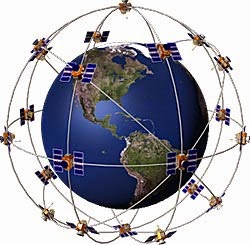
First, it’s interesting to note that you do not “have GPS” you have access to GPS via a GPS receiver. GPS itself is the Global Positioning System. The GPS is actually made up of 24 active satellites orbiting the Earth, with another 3 in orbit as fail-safes should others experience problems. These GPS satellites circle the earth twice each day and transmit signals to Earth.
GPS was originally developed and implemented as a military navigation system in the 70s, but was made available for use by civilians in 1983 by then-president Ronald Reagan. Civilian signals, however, were intentionally degraded in quality until May 1, 2000 by President Clinton.
The orbits are arranged so that at any time, anywhere on Earth, there are at least four satellites “visible” in the sky.
The signal these satellites transmit are low power radio signals. Civilians use the L1 frequency and can receive a signal from GPS only via line of sight. While the signal will pass through clouds or lighter weight objects – buildings and mountains tend to get in the way.
Each signal contains 3 codes. One code identifies the satellite itself. The second transmits the status of the satellite including the date and time. The third code is the Almanac data which tells the receiver where that satellite should be at any given time. A receiver uses this data from each of the satellites to determine your distance from each of those satellites. Your distance from each of those known points tells the receiver the point of your location.
As far as telecommunications go… GPS is hands down one of the coolest inventions since the telephone – both amazingly simply – and astoundingly elaborate in its construction.
Have you ever gotten mad at your GPS for not working right?
Garmin shares the most common reasons for GPS errors:
Factors that can degrade the GPS signal and thus affect accuracy include the following:
Ionosphere and troposphere delays – The satellite signal slows as it passes through the atmosphere. The GPS system uses a built-in model that calculates an average amount of delay to partially correct for this type of error.
Signal multipath – This occurs when the GPS signal is reflected off objects such as tall buildings or large rock surfaces before it reaches the receiver. This increases the travel time of the signal, thereby causing errors.
Receiver clock errors – A receiver’s built-in clock is not as accurate as the atomic clocks onboard the GPS satellites. Therefore, it may have very slight timing errors.
Orbital errors – Also known as ephemeris errors, these are inaccuracies of the satellite’s reported location.
Number of satellites visible – The more satellites a GPS receiver can “see,” the better the accuracy. Buildings, terrain, electronic interference, or sometimes even dense foliage can block signal reception, causing position errors or possibly no position reading at all. GPS units typically will not work indoors, underwater or underground.
Satellite geometry/shading – This refers to the relative position of the satellites at any given time. Ideal satellite geometry exists when the satellites are located at wide angles relative to each other. Poor geometry results when the satellites are located in a line or in a tight grouping.
Intentional degradation of the satellite signal – Selective Availability (SA) is an intentional degradation of the signal once imposed by the U.S. Department of Defense. SA was intended to prevent military adversaries from using the highly accurate GPS signals. The government turned off SA in May 2000, which significantly improved the accuracy of civilian GPS receivers.
This is NOT the kind of surprise most businesses want to find in the mail. A seven-person architecture firm in Georgia can attest to that. TW Telecom, in late March, experienced a 44-hour security take-down. During that time, the firm’s international calling plan was hacked.
In the digital age, telecom hacking has become an increasing problem for small businesses. According to our source story, the Communications Fraud Control Association found that global losses from telephone fraud in 2013 totaled an estimated $46.3 billion — up $6.95 billion from 2011.
Not all frauds are easy to catch. If your business regularly makes and receives calls in and out of the country – these instances can become more difficult to catch.
If you believe you may be getting overcharged for telecom services, it is important to contact experts who can audit your bills and recover your funds. Luckily, the better Telecom Bill Recovery Services will work on a contingency basis. I have been helping companies reduce their telecom costs for over 30 years. If you would like your telecom contracts thoroughly reviewed by a seasoned expert with a consistent record of securing savings, contact me today.
DID YOU KNOW that utility companies often have more than one rate for commercial/business clients?
GUESS WHAT. They don’t hand out the best rates automatically. Customers must seek better rates for themselves.
The process of finding the best and most appropriate rate can be tedious – and frankly – as a business owner, you’re already busy running your own business.
This is where Applied Utility Auditors can help. We find overcharges for 80% of all clients.
You might be reading this because your business was referred to AUA or because we’ve contacted you about conducting a utility audit and you have questions. We’re fortunate that the majority of our customers come from happy client referrals.
Here are a few quick points:
First, when you’re with Applied Utility Auditors, you’re in good hands. Our team has over 75 years of collective experience in auditing:
Have you ever ever wondered where some words and phrases come from? Here are a few we can finally stop wondering about…
Booze – A combination of the Middle English (c.1300) verb “bouse”, meaning to drink heavily, AND the name of a famous Philadelphia distiller named E.G. Booze. Ben Franklin published a book of synonyms in 1722 and used the word “boozy” as a synonym for “drunk”.
Three sheets to the wind – was originally used to describe a drunk person in 1812 to describe the image of a sloop-rigged sailboat whose three “sheets” or sails had slipped through their blocks and were thus lost to the wind, and “out of control”.
Hammered – originally meant to be “heavily defeated”, and became officially recognized in 1986 as meaning drunk.
Dashboard – the original dashboard was a board in the front of wagons and carriages to stop mud from horses hooves from splashed into the vehicle.
Limousine – comes from the name of the Limousin region in France, where the chief city is Limoge. Apparently, the people of that region traditionally wore a hood that was similar to the hood, or profile of early luxury cars.
Chauffeur – another word with French origins meaning the “stoker” or operator of the steam engine (chaud, meaning “hot”, thus “chauffer” meaning “to heat”, from the Old French verb “chaufer” –“ to heat”.
Enough drinking and driving slang – Why are we buried in a…
Coffin – early 14th C. for a place to store valuables, taken from the Old French “coffin” meaning “sarcophagus”.
Dead as a doornail – meant “insensible” in the 1300’s, and by the 1500’s meant “inactive and dull”.
Dead man’s hand – in poker comes from the pair of aces and pair of eights that Wild Bill Hickock was holding when Jack McCall shot him in 1876.
Back to drinkin…
Dead Drunk – was first used in the 1590’s, and in a “dead soldier” became an empty bottle of liquor in 1913.
Thank you to the television show – “American Slang”, and to the web-site “Online Etymology” If you ever want to grow a braincell back after all of that drinking… Check out Paul’s Pick of the week: “Online Etymology”
And a final thought…
“What the caterpillar calls the end of the world, the master calls a butterfly. – Richard Bach
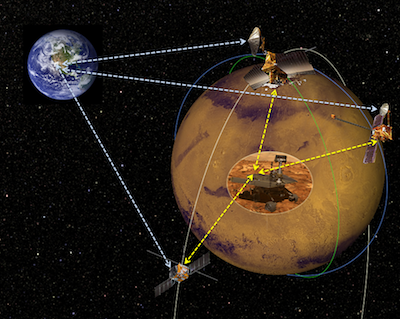
In an effort to speed up data connections between Mars and Earth, NASA has reached out to US and international companies and scientists for solutions.
Currently, NASA depends on satellites used for research carrying specially designed radios – but the current technology is aging, insufficient, and will likely deteriorate before NASA’s budget allows for more satellites to be launched.
The Federal Business Opportunities website (http://FBO.com) states that the project would consist of “orbiters capable of providing standardized telecommunication services for rovers and landers on the Martian surface, in the Martian atmosphere, or in Mars orbit.”